Hello Friends,
From certain site tracking services, I have been looking at the way people come to know about my blog and I realized that only few of them access my blog directly (using its main URL). Most of them come looking for some hack (like social bookmarking, Google Translate etc) and land on an individual post page. When they land on such a page, a lot of space under the article + comments section goes waste as my blog’s sidebars (in most cases) are longer than the length of the post + comments section. This is also the case on label, archive and search pages. I was wondering how to make efficient utilization of this wasted space so that such first time readers (of my blog) get enough information about my other posts and I am able to convert them to returning readers/visitors.
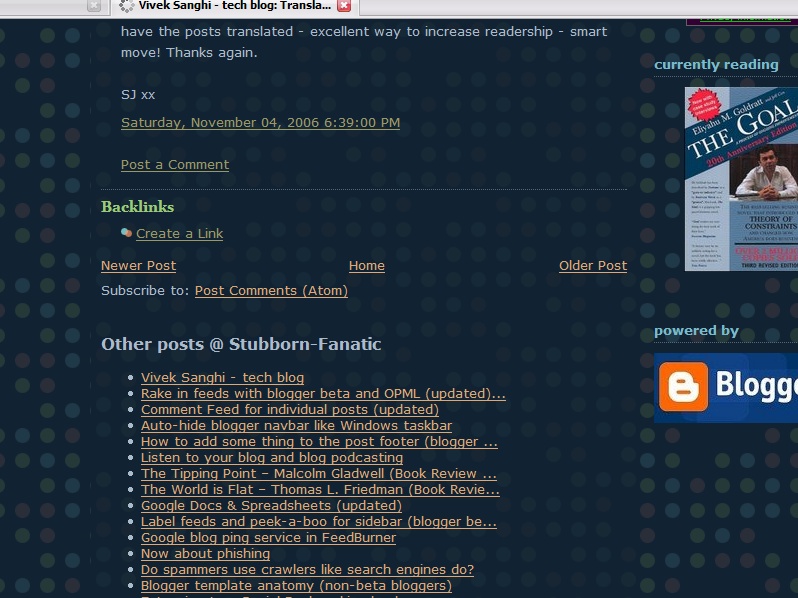
I turned to instabloke for ideas and found that Blogbloke has made very good use of this space by posting a list of other articles, newsfeeds of his blog and adsense code. Inspired by his ingenuity, I decided to implement the same for blogger beta. To understand what I am talking about have a look at these pictures:
1. Bottom of the “main” section on my blog’s main page:

2. Bottom of the “main” section on a label page:

3. Bottom of the “main” section on a individual post/comments page:
You will notice that certain sections that do not appear on my blog’s main page appear on the label, archive, post/comments and search pages (I refer to them as “non-main” pages). See this image below. The highlighted widgets in the following image do not appear on the main page but appear on all other pages (i.e. non-main pages):
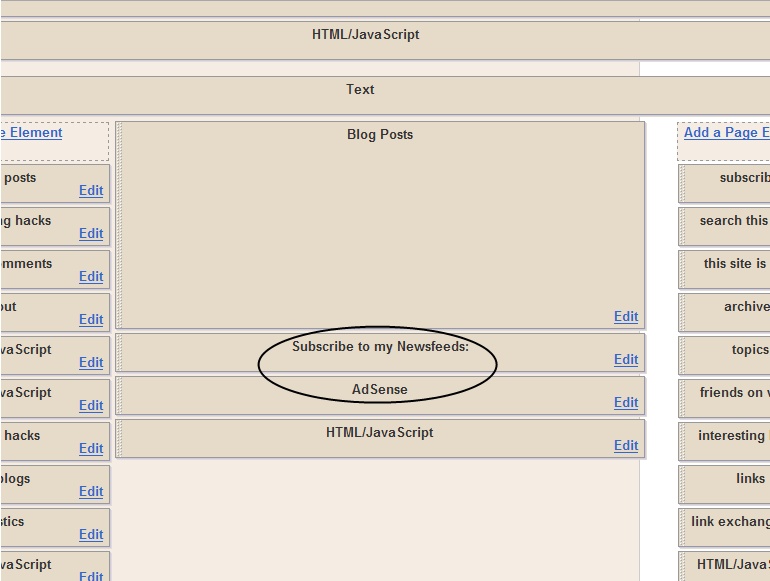
Here’s how you can also make a widget to appear on all other pages except the main blog page.
1. Add a page element

First add a page element (widget) of your choice from you blog’s page element (Edit Layout) section. Don’t forget to give it a unique title as it becomes easier to search for the widget in the template code.
2.View template code

Then go to the Edit HTML section of your blog and view the expanded widgets template code. (Please make a backup copy of your template before you proceed)
3. Search for the newly added widget/page element
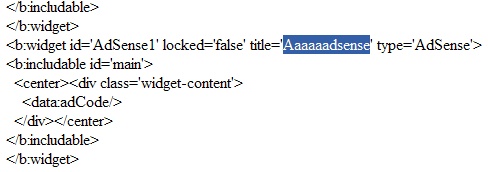
Now in template code search for the widget you just added using its title.
4. Modify the Widget code
Modify the code as shown below by adding the “if” condition (in bold). Make sure you add the “if” condition just after the <b:includable id=’main’ section> and the closing “if” code just before the </b:includable>.
<b:widget id=’AdSense1′ locked=’false’ title=” type=’AdSense’>
<b:includable id=’main’>
<b:if cond=’data:blog.homepageUrl != data:blog.url’>
<div class=’widget-content’>
<data:adCode/>
</div>
</b:if>
</b:includable>
</b:widget>
5. Now save the template and you are done.
A special mention here for an Ajax-based hack by Hoctro which I used to display a large number of posts on my blog’s “non-main” pages. I did not use the feed widget for this purpose as Blogger limits the list to a max of five posts.
So go ahead and fill up those spaces and feel free to drop a line if you face any issues.
Update-01: To learn how to display widgets only on the blog’s main page click here.
Update-02: To learn how to display a widget only on a particular label page or any other URL (from the same blog), click here.
Comments
74 responses to “Displaying widgets only on comment, label, search and archive pages”
Hm, I wonder how one could do it the other way round, because I’d prefer to have certain widgets only appear on the main page instead.
Hello Alastor. You can make certain widgets display only on the main page using the following “if” constructs:
<b:if cond=’data:blog.homepageUrl == data:blog.url’>
</b:if>
Hello Alastor. You can make certain widgets display only on the main page using the following “if” constructs:<b:if cond=’data:blog.homepageUrl == data:blog.url’></b:if>
Good post vivek. You beat me to the punch writing about it. 😉
Unfortunately most bloggers are mistakenly not tapping into the power (and extra space) that post pages provide.
Cheers!
…BB
Good post vivek. You beat me to the punch writing about it. ;-)Unfortunately most bloggers are mistakenly not tapping into the power (and extra space) that post pages provide.Cheers!…BB
Hi Vivek,
Thank you for this great hack!
Hi Vivek,Thank you for this great hack!
Thank you!
@alastor;@goygoycu
Thanks for dropping by and reading my hacks.
@alastor;@goygoycuThanks for dropping by and reading my hacks.
@Blogbloke
Thanks for dropping by Blogbloke. I have always looked upto instabloke for sensible design ideas and features. I agree with you as the main section of a blog is really powerful in attracting reader attention. Many visitors may not even glance at the sidebars but there is little chance that they will miss the main section.
@BlogblokeThanks for dropping by Blogbloke. I have always looked upto instabloke for sensible design ideas and features. I agree with you as the main section of a blog is really powerful in attracting reader attention. Many visitors may not even glance at the sidebars but there is little chance that they will miss the main section.
@ blogbloke
I agree with Vivek. Many of my visitors are coming from google to my post pages. This hack enables adding more content in blogs.
@ blogblokeI agree with Vivek. Many of my visitors are coming from google to my post pages. This hack enables adding more content in blogs.
Great tutorial, Vivek! Thanks for having a link back to my post, for I refer him back to this post, hence saving me time. I also write up something about your post.
Hello Hoctro. Thanks a ton for featuring this post on your blog!
thanks again bro,i use this and its work!now i will use your hack to use for sidebar adsense.A good news to blogger beta user,i have a method to put adsense in the post.Check this at:
http://bloggingsecret.blogspot.com/2006/11/ultimate-adsense-guide-insert-adsense.html
i think this would be your good news too.All the best,bro!
thanks again bro,i use this and its work!now i will use your hack to use for sidebar adsense.A good news to blogger beta user,i have a method to put adsense in the post.Check this at:http://bloggingsecret.blogspot.com/2006/11/ultimate-adsense-guide-insert-adsense.htmli think this would be your good news too.All the best,bro!
@LOUI$$
Thanks for dropping by
@LOUI$$Thanks for dropping by
@ Vivek
Hi again,
I’ve used your hack with a feed element but it gives me an error on internet exlorer : “Exception thrown and not caught”. I’m sure it’s about the hack because after I’ve modified the code to original, it turned back to normal again.
Here is the code I’ve used:
[b:widget id=’Feed2′ locked=’false’ title=’Recent Posts’ type=’Feed’]
[b:includable id=’main’]
[b:if cond=’data:blog.homepageUrl != data:blog.url’]
[h2][data:title/][/h2]
[div class=’widget-content’]
[ul expr:id=’data:widget.instanceId + “_feedItemListDisplay”‘]
[b:loop values=’data:feedData.items’ var=’i’]
[li]
[span class=’item-title’]
[a expr:href=’data:i.alternate.href’]
[data:i.title/]
[/a]
[/span]
[b:if cond=’data:showItemDate’]
[b:if cond=’data:i.str_published != “”‘]
[span class=’item-date’]
- [data:i.str_published/]
[/span]
[/b:if]
[/b:if]
[b:if cond=’data:showItemAuthor’]
[b:if cond=’data:i.author != “”‘]
[span class=’item-author’]
- [data:i.author/]
[/span]
[/b:if]
[/b:if]
[/li]
[/b:loop]
[/ul]
[b:include name=’quickedit’/]
[/div]
[/b:if]
[/b:includable]
[/b:widget]
@ VivekHi again,I’ve used your hack with a feed element but it gives me an error on internet exlorer : “Exception thrown and not caught”. I’m sure it’s about the hack because after I’ve modified the code to original, it turned back to normal again. Here is the code I’ve used:[b:widget id=’Feed2′ locked=’false’ title=’Recent Posts’ type=’Feed’][b:includable id=’main’][b:if cond=’data:blog.homepageUrl != data:blog.url’] [h2][data:title/][/h2] [div class=’widget-content’] [ul expr:id=’data:widget.instanceId + “_feedItemListDisplay”‘] [b:loop values=’data:feedData.items’ var=’i’] [li] [span class=’item-title’] [a expr:href=’data:i.alternate.href’] [data:i.title/] [/a] [/span] [b:if cond=’data:showItemDate’] [b:if cond=’data:i.str_published != “”‘] [span class=’item-date’] - [data:i.str_published/] [/span] [/b:if] [/b:if] [b:if cond=’data:showItemAuthor’] [b:if cond=’data:i.author != “”‘] [span class=’item-author’] - [data:i.author/] [/span] [/b:if] [/b:if] [/li] [/b:loop] [/ul] [b:include name=’quickedit’/] [/div][/b:if] [/b:includable][/b:widget]
Dear Vivek,
Thanks for your tip, nevertheless i got a question,
I would like to create a widget (a picture by exemple) which only appear on the a specific month or labels.
Do you have any idea?
😉
Dear Vivek,Thanks for your tip, nevertheless i got a question,I would like to create a widget (a picture by exemple) which only appear on the a specific month or labels.Do you have any idea?;)
@protesto
Hello Protesto. First I recommend that you delete this feed widget from your layout and add it again. Then edit your template code and insert this hack.
If it still doesn’t work try removing the line:
<b:include name=’quickedit’/>
and saving the template. If the problem persists, copy your entire template code into a test file and mail it to me as an attachment. “Exceptions” refer to some problem with javascript I think.
@protestoHello Protesto. First I recommend that you delete this feed widget from your layout and add it again. Then edit your template code and insert this hack. If it still doesn’t work try removing the line:<b:include name=’quickedit’/>and saving the template. If the problem persists, copy your entire template code into a test file and mail it to me as an attachment. “Exceptions” refer to some problem with javascript I think.
@KCA
I could find out the code for displaying a widget (say image) only on a particular label page but I am not sure how to get it on a particular month. If you provide me an exact explanation of how you want it by month I can try exploring it. Here is the code for label pages. The “if” construct is in bold. Remove the [ ] but not the quotation marks while using it:
<b:widget id=’Image1′ locked=’false’ title=” type=’Image’>
<b:includable id=’main’>
<b:if cond=’”[your label URL in these quotation marks]” == data:blog.url’>
<b:if cond=’data:title != “”‘>
<h2><data:title/></h2>
</b:if>
<div class=’widget-content’>
<img expr:alt=’data:title’ expr:height=’data:height’ expr:id=’data:widget.instanceId + “_img”‘ expr:src=’data:sourceUrl’ expr:width=’data:width’/>
<br/>
<b:if cond=’data:caption != “”‘>
<span class=’caption’><data:caption/></span>
</b:if>
</div>
</b:if>
</b:includable>
</b:widget>
Example is here. Click on label test2 to check.
@KCAI could find out the code for displaying a widget (say image) only on a particular label page but I am not sure how to get it on a particular month. If you provide me an exact explanation of how you want it by month I can try exploring it. Here is the code for label pages. The “if” construct is in bold. Remove the [ ] but not the quotation marks while using it:<b:widget id=’Image1′ locked=’false’ title=” type=’Image’><b:includable id=’main’><b:if cond=’”[your label URL in these quotation marks]” == data:blog.url’> <b:if cond=’data:title != “”‘> <h2><data:title/></h2> </b:if> <div class=’widget-content’> <img expr:alt=’data:title’ expr:height=’data:height’ expr:id=’data:widget.instanceId + “_img”‘ expr:src=’data:sourceUrl’ expr:width=’data:width’/> <br/> <b:if cond=’data:caption != “”‘> <span class=’caption’><data:caption/></span> </b:if> </div></b:if> </b:includable></b:widget>Example is here. Click on label test2 to check.
Dear Vivek,
Today you made a happy man: ME!!!:O)
Thanks for the code!
When i talk about month, i just would like a different widget (text, image…) to appears when a visitor click click on the specifief month… I don’t know how to explain…english so-so:(
Dear Vivek,Today you made a happy man: ME!!!:O)Thanks for the code!When i talk about month, i just would like a different widget (text, image…) to appears when a visitor click click on the specifief month… I don’t know how to explain…english so-so:(
@ Vivek
Thanks for your reply, I did your solution but I couldn’t get it work. I’ve added an html element,modified it with your hack and it’s working perfectly. I think the problem is about feed widget.
@ VivekThanks for your reply, I did your solution but I couldn’t get it work. I’ve added an html element,modified it with your hack and it’s working perfectly. I think the problem is about feed widget.
@KCA
Thanks! If you want a widget to display for a particular month, you can have that month’s URL instead of the label URL. You can get a particular month’s URL by clicking on that month on your archive list. In addition, you can have a widget displayed only on a specific post pages as well:
<b:if cond=’”[archive month URL1]” == data:blog.url’>
</b:if>
(or)
<b:if cond=’”[Post URL1]” == data:blog.url’>
</b:if>
@protesto
I had used this hack with a feed widget before I implemented Hoctro’s list of posts hack. If you wish to pursue this matter, do send in your template code via e-mail and I might be able to fix this problem. Also to see this hack in action with a feed widget click here and then click on any label, archive or title link.
@KCAThanks! If you want a widget to display for a particular month, you can have that month’s URL instead of the label URL. You can get a particular month’s URL by clicking on that month on your archive list. In addition, you can have a widget displayed only on a specific post pages as well:<b:if cond=’”[archive month URL1]” == data:blog.url’></b:if>(or)<b:if cond=’”[Post URL1]” == data:blog.url’></b:if>@protestoI had used this hack with a feed widget before I implemented Hoctro’s list of posts hack. If you wish to pursue this matter, do send in your template code via e-mail and I might be able to fix this problem. Also to see this hack in action with a feed widget click here and then click on any label, archive or title link.
@vivek
Oh, I’ve got exacly the same error message from your test page. Maybe it’s about internet explorer’s settings. I will try it at home again and let you know. Thanks for your efforts.
@vivekOh, I’ve got exacly the same error message from your test page. Maybe it’s about internet explorer’s settings. I will try it at home again and let you know. Thanks for your efforts.
@protesto
Then I guess the IE settings are the culprit as you pointed out. BTW I did check in IE7 and it works fine there.
@protestoThen I guess the IE settings are the culprit as you pointed out. BTW I did check in IE7 and it works fine there.
vivek,how do you have 3 feed count?how you do it?
I did not get any error message at home. Thanks again.
@LOUI$$
That’s three for: Excerpts(summary) feed, Full feed, podcast. To know how to use these feeds check out:
beta’s feeds
blog podcasting
@protesto
That’s nice.
@LOUI$$That’s three for: Excerpts(summary) feed, Full feed, podcast. To know how to use these feeds check out:beta’s feedsblog podcasting@protestoThat’s nice.
great site, nice tricks!!
hi, vivek!
how can the widget only be shown in the individual post, while not archive or label pages? Sorry for taking your time.
hi, vivek! how can the widget only be shown in the individual post, while not archive or label pages? Sorry for taking your time.
@anonymous
Thanks!
@refr. (dailyrefreshment)
NP. It is possible to display widgets only on certain post’s page (but not inside the post itself). You can use the example shown here to implement this hack.
If you want to display a widget only on this page, place that URL in the highlighted quotation marks and the widget will come up only on that post page.
If you want a widget to appear on all the post pages and nowhere else use this condition:
<b:if cond=’data:blog.pageType == “item”‘>
</b:if>
Let me know if this answers your question. Cheers!
@anonymousThanks!@refr. (dailyrefreshment)NP. It is possible to display widgets only on certain post’s page (but not inside the post itself). You can use the example shown here to implement this hack.If you want to display a widget only on this page, place that URL in the highlighted quotation marks and the widget will come up only on that post page.If you want a widget to appear on all the post pages and nowhere else use this condition:<b:if cond=’data:blog.pageType == “item”‘></b:if>Let me know if this answers your question. Cheers!
Thanks, Vivek! The hack you gave really works.
Thanks, Vivek! The hack you gave really works.
the problem is that the content of the widget is gone but the title still shows. 🙁 what to do???
@Cyber-Buff: Hello there! I did not understand your question completely. However, from what I could get, I think all the widget code (as seen via template > page elements > “Edit”) is gone but the heading still appears on your blog. A straight solution to this will be to delete the widget which has this heading from your layout section using the “Remove page element button”.
Otherwise, edit your template HTML (non expanded) and locate the widget with this heading using the text from heading in the search (ctrl+F) and the delete the widget code.
CAUTION: If you are not sure about this, please get in touch with me via e-mail. Cheers!
@Cyber-Buff: Hello there! I did not understand your question completely. However, from what I could get, I think all the widget code (as seen via template > page elements > “Edit”) is gone but the heading still appears on your blog. A straight solution to this will be to delete the widget which has this heading from your layout section using the “Remove page element button”.Otherwise, edit your template HTML (non expanded) and locate the widget with this heading using the text from heading in the search (ctrl+F) and the delete the widget code.CAUTION: If you are not sure about this, please get in touch with me via e-mail. Cheers!
So far it works on the main label pages. Now I got a widget only showing on one Label, but when I look at older posts from this label the widget disappears. There should be a little modification so that the widget gets displayed even if there has been another ending attached to the URL, for example:
http://truelife200iv.blogspot.com/search/label/%27Aqidah
http://truelife200iv.blogspot.com/search/label/%27Aqidah?updated-max=2006-10-01T01%3A00%3A00%2B02%3A00&max-results=20
I want the widget to show on post pages.
So far it works on the main label pages. Now I got a widget only showing on one Label, but when I look at older posts from this label the widget disappears. There should be a little modification so that the widget gets displayed even if there has been another ending attached to the URL, for example:http://truelife200iv.blogspot.com/search/label/%27Aqidahhttp://truelife200iv.blogspot.com/search/label/%27Aqidah?updated-max=2006-10-01T01%3A00%3A00%2B02%3A00&max-results=20I want the widget to show on post pages.
@truelife:
Thanks for visiting my blog. Please note that if you want to display a widget only on label pages it will not appear on any other page. However, if you want to sidplay a widget only on all post pages (item pages), use this code:
<b:if cond=’data:blog.pageType == "item"’>
</b:if>
If you want to display a widget on a label’s page and on all the posts with in that label you might have to use a very long nested “if” “else” statement.
In the code that you have mentioned, you can update the number of result from 20 to 100 like I have done in my blog. Also check out this link for a tutorial to permanently apply this setting to you labels. Hope this helps.
@truelife: Thanks for visiting my blog. Please note that if you want to display a widget only on label pages it will not appear on any other page. However, if you want to sidplay a widget only on all post pages (item pages), use this code:<b:if cond=’data:blog.pageType == "item"’></b:if>If you want to display a widget on a label’s page and on all the posts with in that label you might have to use a very long nested “if” “else” statement.In the code that you have mentioned, you can update the number of result from 20 to 100 like I have done in my blog. Also check out this link for a tutorial to permanently apply this setting to you labels. Hope this helps.
Hi again Vivek, i want to ask one question: how can i show a widget in all pages other than post/comments page. I want to show in homepage, label pages, archive pages, search pages but not in comments pages. Thanks again for the this hack and for your help.
Hello Escaper. Try the following if condition.
<b:if cond=’data:blog.pageType != "item"’>
</b:if>
Hello Escaper. Try the following if condition.<b:if cond=’data:blog.pageType != "item"’></b:if>
Thanks all of your help Vivek, i have done it and it works great;)
Hi,
I would like my main page to display only post with a certain label and a link to recent post (of any label). How could I do that?
Thanks.
Hi, I would like my main page to display only post with a certain label and a link to recent post (of any label). How could I do that?Thanks.
Hey,
This hack works great for the adsense widget but can it be used for labels showing only on post pages and not the main page?
The labels widget already has conditionals like (/b:if) and trying to add the code and conditional you gave in the adsense example just gives error codes. I’ve read the comments but I’m not sure if one of those applies to the labels widget.
Hey,This hack works great for the adsense widget but can it be used for labels showing only on post pages and not the main page?The labels widget already has conditionals like (/b:if) and trying to add the code and conditional you gave in the adsense example just gives error codes. I’ve read the comments but I’m not sure if one of those applies to the labels widget.
I 0wn this blog called http://www.orkuttricks.blogspot.com
I wanted to put up a text widget called “Welcome to orkut tricks”(title) with some info about the site in it.I wanted this to be visible only on the homepage.
I tried as what was said but still this widget is visible on all pages & not only on home
[b:includable id=’main’][b:if cond=’data:blog.homepageUrl == data:blog.url’][/b:if][div class=’widget-content’][data:content/][/div]
plzzzzzzzzzzzzzzzzz help
I 0wn this blog called http://www.orkuttricks.blogspot.comI wanted to put up a text widget called “Welcome to orkut tricks”(title) with some info about the site in it.I wanted this to be visible only on the homepage.I tried as what was said but still this widget is visible on all pages & not only on home[b:includable id=’main’][b:if cond=’data:blog.homepageUrl == data:blog.url’][/b:if][div class=’widget-content’][data:content/][/div]plzzzzzzzzzzzzzzzzz help
Why can’t I get this to work? i am trying to put widgets on main page only because they are screwing up my posts pages. Help please! http://www.blissfulglutton.com
@The Blissful Glutton
Hello there. I checked the link you posted at the end of your message and checked your blog’s main and post pages. However I could not find the problem you have mentioned. Could you send me the link of a specific post page where you are facing this problem such that I can replicate it at my end and provide a solution.
@The Blissful GluttonHello there. I checked the link you posted at the end of your message and checked your blog’s main and post pages. However I could not find the problem you have mentioned. Could you send me the link of a specific post page where you are facing this problem such that I can replicate it at my end and provide a solution.
hi vivek, how can i show a widget in search result page only…? can i do that…?
thx
hi vivek, how can i show a widget in search result page only…? can i do that…?thx
hi vivek, can we make certain widgets display only on the search result…
thx in advance
hi vivek, can we make certain widgets display only on the search result…thx in advance
this hack does not show content on blog but it keeps space for content. How i could also hide this space on blog from main page?